MultiType Pixel Compact: A Detailed Evaluation
In the landscape of digital typography, pixel fonts have evolved significantly from their rudimentary origins in early computing. They are no longer just a nostalgic nod to 8-bit gaming; they are a sophisticated design tool capable of conveying precision, retro-futurism, and structured modernity. Among the various options available to designers, MultiType Pixel Compact has emerged as a distinct choice for those seeking a balance between readability and stylized aesthetics. This evaluation explores the characteristics, technical specifications, and practical applications of this font to help designers determine if it aligns with their project requirements.
Understanding MultiType Pixel Compact
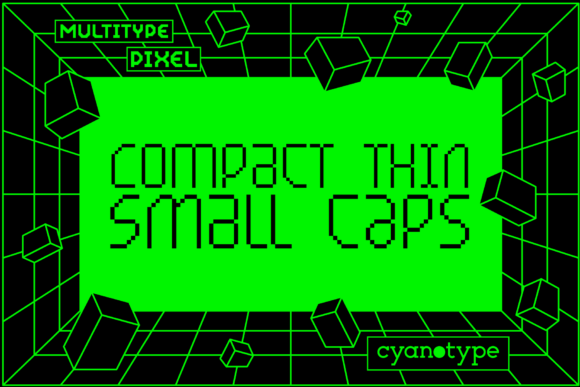
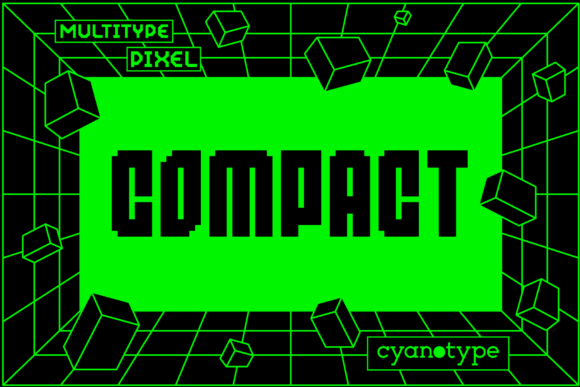
At its core, MultiType Pixel Compact is a pixelated display font characterized by its unique geometric structure. Unlike standard monospaced pixel fonts that prioritize uniform character width for coding environments, this typeface offers a more dynamic visual rhythm. The "Compact" designation suggests a tighter kerning and a denser grid usage, allowing text to occupy less horizontal space while maintaining legibility at small sizes. This makes it particularly suitable for interfaces or layouts where space efficiency is paramount without sacrificing the distinctive retro-modern aesthetic.
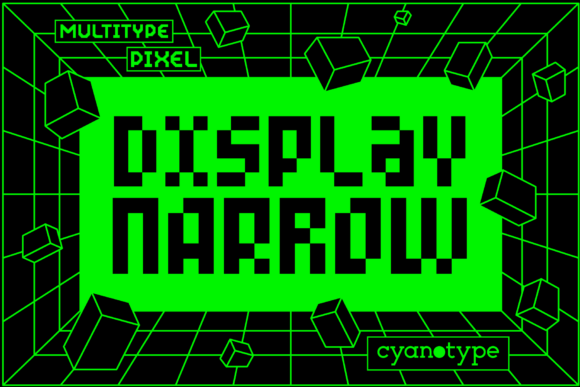
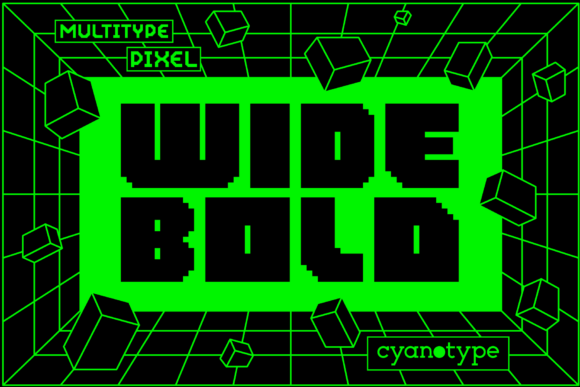
The font distinguishes itself through a "cool, uniquely shaped" profile. It avoids the rigid squareness often associated with basic bitmap fonts, introducing subtle variations in stroke width and corner treatment that give it a trendy, distorted edge. This distortion is not random; it is a calculated stylistic choice that adds personality to headlines, logos, and UI elements. For designers looking to inject a sense of digital grit or cyberpunk-inspired flair into their work, MultiType Pixel Compact provides a ready-made solution that requires minimal additional graphic manipulation.
Technical Specifications and Accessibility
A critical factor in font selection for web and digital design is encoding compatibility. MultiType Pixel Compact utilizes PUA (Private Use Area) encoding. To understand why this matters, it is helpful to look at how fonts handle special characters. Standard Unicode encoding assigns specific code points to letters, numbers, and common symbols. However, decorative elements such as swashes, alternate glyphs, and specialized icons often exceed the capacity of standard sets or conflict with existing characters.
By encoding these extra features in the PUA, the font creator ensures that all glyphs and swashes are accessible without breaking standard text flow. This means that when you select a swash or an alternate character in your design software, it maps to a private area that does not interfere with the underlying text structure. For the user, this translates to ease of access. You can experiment with different typographic variations—such as extended serifs or decorative corners—without worrying about compatibility issues across different operating systems or browsers, provided the font is correctly installed or embedded.
- Full Glyph Access: Designers can utilize the complete range of included swashes and alternates.
- Encoding Stability: PUA encoding prevents conflicts with standard ASCII/Unicode characters.
- Software Compatibility: Works seamlessly with major vector and raster design tools that support custom font mappings.
Design Applications and Use Cases
The versatility of MultiType Pixel Compact lies in its ability to bridge the gap between pure nostalgia and contemporary design trends. It is not limited to video game aesthetics. Instead, it serves as a powerful accent font in various contexts.
User Interface and Dashboard Design
In data-heavy dashboards or HUD (Heads-Up Display) designs, information density is key. The compact nature of this font allows designers to present numerical data, status indicators, and system logs in a condensed format. The pixelated style reinforces the idea of digital monitoring and technical precision. When used for labels or headers within a sci-fi or tech-oriented interface, it enhances the thematic consistency of the design.
Branding and Logo Design
For brands targeting a younger demographic or those operating in the gaming, streaming, or creative technology sectors, MultiType Pixel Compact offers immediate visual recognition. Its distorted and trendy touch can be leveraged in logo construction to create a memorable mark. The unique shapes of the letters allow for creative ligatures and icon integration, making it easier to build a cohesive brand identity around a central typographic element.
Editorial and Poster Design
While pixel fonts are often avoided for body text due to readability concerns, they excel in large-scale display applications. Posters, album covers, and event flyers benefit from the high contrast and sharp edges of MultiType Pixel Compact. The font commands attention and creates a strong visual hierarchy. When paired with clean, sans-serif body text, it provides a striking juxtaposition that guides the viewer’s eye effectively.
Evaluating Tradeoffs and Limitations
No single typeface is a universal solution. Understanding the limitations of MultiType Pixel Compact is essential for making an informed decision. The primary tradeoff involves readability at smaller sizes. While the "compact" design aids in space efficiency, the pixelated structure can become muddy if scaled down too far on low-resolution displays. Designers must test the font rigorously across different devices and screen densities to ensure that the intended aesthetic is preserved without losing legibility.
Additionally, the use of PUA encoding requires careful handling during development. If a website embeds this font, developers must ensure that the CSS correctly references the PUA code points for the decorative elements. Failure to map these correctly can result in missing characters or fallback to default glyphs, which disrupts the visual intent. This adds a layer of complexity compared to using standard Unicode fonts, requiring a slightly higher level of technical proficiency from the implementer.
Furthermore, the "distorted" style may not suit all brand voices. Brands aiming for elegance, corporate professionalism, or minimalist purity might find the pixelated aesthetic too aggressive or informal. In such cases, the font could clash with the desired tone, creating a disjointed user experience.
Alternatives and Decision-Making Insights
If MultiType Pixel Compact does not meet your specific needs, several alternatives exist depending on your priorities. For projects requiring stricter grid adherence and maximum readability in code editors, standard monospaced pixel fonts like VCR OSD Mono or Press Start 2P might be more appropriate. These fonts offer superior clarity for long-form text but lack the unique shaping and swash capabilities of MultiType.
For designs that require a softer, more approachable retro feel, variable weight pixel fonts or rounded pixel types could provide a gentler alternative. Conversely, if the goal is extreme boldness and impact, heavy-weight display pixel fonts with exaggerated proportions might be worth considering.
To determine if MultiType Pixel Compact is the right fit, consider the following questions:
- What is the primary function of the text? Is it for display/headlines or body reading? This font is optimized for display.
- Does the brand voice align with the aesthetic? Does the "distorted" and "trendy" vibe match your target audience's expectations?
- Do you need extensive glyph variation? If you rely heavily on swashes and alternate characters for creative expression, the PUA encoding of this font is a significant advantage.
- Is space efficiency critical? If you need to fit more content into limited UI spaces without sacrificing style, the compact design is a strong selling point.
Conclusion
MultiType Pixel Compact represents a thoughtful evolution in pixel typography. By combining a unique, distorted aesthetic with practical PUA encoding and a compact layout, it offers designers a robust tool for modern digital projects. While it may not be suitable for every context—particularly those requiring high-density body text or ultra-minimalist branding—it excels in scenarios demanding visual impact, technical flair, and efficient space usage. For designers evaluating options for gaming interfaces, tech branding, or editorial displays, MultiType Pixel Compact warrants serious consideration as a versatile and stylish asset in their typographic toolkit.