Evaluating Coolis: A Bold Display Font for High-Impact Design Projects
In the landscape of digital typography, selecting the right display font is rarely a matter of mere aesthetic preference; it is a strategic decision that influences readability, brand perception, and user engagement. Among the myriad options available to designers, Coolis has emerged as a distinct choice for projects requiring immediate visual impact. Characterized by its bold weight and adaptable structure, this typeface offers a specific set of features that cater to modern design needs, particularly those involving high-contrast layouts and attention-grabbing headlines.
For professionals evaluating typefaces for commercial or editorial use, understanding the technical and functional nuances of a font like Coolis is essential. This analysis explores the characteristics of Coolis, its technical implementation via PUA encoding, and how it compares to broader categories of chunky, lettered fonts. The goal is to provide a balanced perspective on when this tool fits into a designer’s workflow and where alternative solutions might serve better.
Defining the Characteristics of Coolis
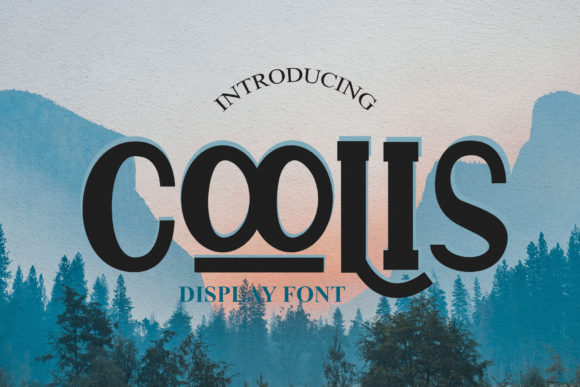
Coolis is categorized primarily as a bold display font. Unlike text fonts designed for long-form reading, display fonts are intended to be seen at larger sizes, where their unique shapes and weights can command attention. The defining trait of Coolis is its substantial presence on the page. It utilizes thick strokes and tight spacing to create a sense of solidity and confidence. This "chunky" quality makes it particularly effective for titles, posters, logos, and hero sections in web design where the objective is to stop the viewer’s scroll.
What distinguishes Coolis from other heavy sans-serifs or slab serifs is its adaptability. While many bold fonts can feel rigid or static, Coolis incorporates subtle variations in its glyph forms that allow it to shift tone depending on context. It avoids the sterile uniformity often found in geometric sans-serifs, offering instead a more organic, albeit structured, appearance. This balance allows it to function in both minimalist designs, where it serves as the sole focal point, and in complex compositions, where it provides a strong anchor amidst busier elements.
The Role of PUA Encoding in Accessibility
A critical technical aspect of Coolis that warrants discussion is its reliance on Private Use Area (PUA) encoding. For the uninitiated, standard Unicode encoding maps characters to specific code points defined by the Unicode Consortium. However, fonts often include additional glyphs—such as ligatures, swashes, alternate characters, and decorative ornaments—that do not have dedicated Unicode codes. To make these available, designers embed them in the PUA section of the font file.
This approach means that accessing all of the glyphs and swashes in Coolis requires ease of interaction through specific software interfaces. Most modern design tools, such as Adobe Creative Cloud applications, Figma, or Sketch, provide glyph panels that allow users to browse and insert these PUA-encoded characters without needing to memorize obscure key combinations. This feature significantly enhances the creative potential of the font, allowing designers to introduce flair and variation without switching typefaces.
However, this encoding method does present a trade-off. Because PUA characters are not part of the standard Unicode set, they may not render correctly in environments that rely strictly on standard text input, such as basic HTML forms or certain content management systems, unless explicitly handled by CSS or JavaScript. Therefore, while Coolis offers rich visual assets, its deployment requires careful consideration of the output medium.
Coolis in Context: Comparisons with Similar Styles
When evaluating Coolis, it is helpful to place it within the broader ecosystem of bold display fonts. Designers often compare it against traditional slab serifs, heavy geometric sans-serifs, and custom hand-drawn display types. Each category offers different strengths, and understanding these differences aids in making an informed decision.
- Geometric Sans-Serifs: Fonts like Futura or Avant-Garde offer clean lines and mathematical precision. While versatile, they can sometimes lack the emotional weight required for aggressive marketing campaigns. Coolis, with its chunkier profile, provides more visual gravity than typical geometric fonts, making it a stronger choice for headlines that need to convey authority or excitement.
- Slab Serifs: Traditional slab serifs, such as Rockwell or Clarendon, feature thick, block-like serifs. These fonts evoke a sense of history and stability. Coolis differs by often lacking explicit serifs, relying instead on the weight of the main stems to create impact. This gives Coolis a more contemporary, urban feel compared to the vintage aesthetic of classic slabs.
- Hand-Drawn Display Fonts: Many modern brands opt for irregular, hand-lettered styles to appear authentic and approachable. While these fonts excel in personality, they can suffer from legibility issues at smaller sizes. Coolis maintains a higher degree of structural consistency, ensuring that even at large scales, the text remains crisp and readable, provided the background contrast is sufficient.
The comparison reveals that Coolis occupies a middle ground. It is more structured than hand-drawn fonts but more expressive than neutral geometric sans-serifs. This versatility makes it a robust option for brands seeking a modern identity that does not sacrifice readability for style.
Strengths and Limitations in Practical Application
Every typeface has a sweet spot, and Coolis is no exception. Its primary strength lies in its ability to make designs come alive through sheer presence. In a digital environment saturated with content, a bold, well-proportioned headline can cut through the noise. The availability of swashes and alternates via PUA encoding adds a layer of customization that reduces the need for graphic manipulation, saving time during the prototyping phase.
Furthermore, the adaptability of Coolis extends to color and texture. Because of its solid form, it responds well to gradient fills, pattern overlays, and mixed-media effects. Designers can experiment with transparency and blending modes without losing the integrity of the letterforms, a flexibility that thinner fonts often lack.
However, there are limitations to consider. The bold nature of Coolis demands ample whitespace. Attempting to set body copy or dense paragraphs in Coolis will result in poor readability and visual fatigue. It is strictly a display font. Additionally, the reliance on PUA encoding means that if a client or collaborator opens the design file in software that does not support the font properly, the special characters may revert to squares or missing glyphs. This necessitates clear communication and font embedding strategies in final deliverables.
Decision Factors: When to Choose Coolis
Selecting Coolis should be driven by the specific goals of the project rather than trend-following. It is an ideal choice when:
- Impact is Priority: The design requires immediate attention, such as event posters, sale banners, or app launch screens.
- Modern Branding: The brand identity leans towards contemporary, urban, or tech-forward aesthetics rather than traditional or corporate.
- Visual Hierarchy is Key: The layout relies on strong typographic contrast to guide the user’s eye through the content.
Conversely, Coolis may not be the right fit for projects requiring extensive textual content, delicate elegance, or strict accessibility compliance in low-contrast environments. If the goal is to convey sophistication through subtlety, a lighter weight or serif font would likely serve the message better.
Conclusion for the Evaluating Designer
Coolis represents a thoughtful addition to the toolkit of any designer focused on bold, impactful communication. Its combination of a chunky, adaptable structure and rich glyph sets via PUA encoding offers both visual power and creative flexibility. By understanding its technical requirements and stylistic boundaries, designers can leverage Coolis effectively, ensuring that their work not only looks striking but also functions efficiently within the constraints of modern digital platforms. As with any typographic choice, the success of Coolis lies in its appropriate application—used wisely, it transforms static layouts into dynamic experiences.