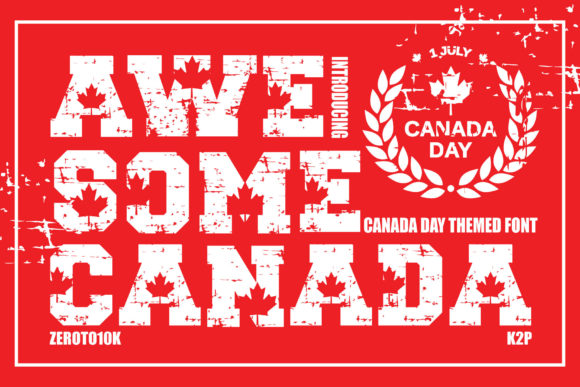
Awesome Canada: Integrating Bold Typography into Professional Design Workflows
In the landscape of digital and print design, typography is rarely just about readability; it is a primary vehicle for tone, brand identity, and immediate visual impact. For designers, marketers, and content creators seeking to inject energy and authenticity into their projects, selecting the right typeface is a critical decision point. Awesome Canada stands out as a bold, incredibly cool, and authentic display font that offers more than just aesthetic appeal—it provides a structural element for storytelling. This article explores how to integrate Awesome Canada into professional workflows, from initial concept development to final production, ensuring that its unique character enhances rather than hinders communication.
Understanding the Role of Display Fonts in Modern Design
Before diving into specific implementation strategies, it is essential to understand where display fonts like Awesome Canada fit within the broader hierarchy of typographic design. Unlike body text fonts, which prioritize legibility over long periods, display fonts are designed to be read at large sizes or for short bursts of attention. They serve as the "hook" in visual communication.
Awesome Canada is characterized by its robust weight and distinct personality. It is not a subtle background element; it is a foreground asset. When used correctly, it signals confidence, adventure, and a sense of place. For professionals working on country descriptions, tourism boards, event promotions, or lifestyle brands, this font acts as a visual shorthand for excitement and national pride. However, because it is so dominant, it requires careful handling to maintain balance in any composition.
Defining the Aesthetic Boundaries
The "authentic" nature of Awesome Canada suggests a connection to heritage, ruggedness, or genuine experience. It avoids the sterile feel of many geometric sans-serifs, offering instead a texture that feels hand-crafted yet modern. When planning a project, designers must first define the emotional goal. If the objective is to convey luxury through minimalism, Awesome Canada might be too heavy. Conversely, if the goal is to evoke a festival atmosphere, a travel brochure, or a bold product launch, the font aligns perfectly with those intentions. Understanding these boundaries prevents misuse and ensures the typography supports the message.
Pre-Production: Planning and Conceptualization
Effective integration of any design asset begins before the software is even opened. In the pre-production phase, the focus should be on context and compatibility. How does Awesome Canada interact with other elements in your layout? What is the intended medium?
- Medium Assessment: Determine whether the output will be digital (web, social media) or physical (print, signage). Display fonts often have intricate details that may get lost in low-resolution prints or on small mobile screens. Testing scalability early in the process helps avoid costly revisions later.
- Brand Alignment: If Awesome Canada is being used for a client or a personal brand, ensure it complements existing visual assets. Does it clash with current color palettes? Does it support the existing logo? A font that fights against other brand elements creates visual noise rather than clarity.
- Pairing Strategy: One of the most common mistakes in workflow management is failing to plan for contrast. Awesome Canada is a loud voice; it needs a quiet partner. Identify simple, neutral sans-serif or serif fonts that will handle the bulk of the informational text. This contrast ensures that while the headline grabs attention, the supporting copy remains readable.
Implementation: Execution and Layout Techniques
Once the conceptual framework is established, the execution phase involves placing Awesome Canada within the design grid. The key to using such a bold font is restraint. Because it carries so much visual weight, it should be used sparingly to maximize its impact.
Strategic Placement and Hierarchy
In a typical document or webpage, information flows in a hierarchy. Awesome Canada should occupy the top tier of this hierarchy. Use it for main headlines, section dividers, or call-to-action buttons. Avoid using it for subheadings or body text. Even when used for subheads, consider reducing the tracking (letter spacing) slightly to tighten the word shape, which can improve readability without sacrificing style.
Consider the use of negative space. Because Awesome Canada is visually dense, surrounding it with ample white space allows the eye to rest and appreciate the form of the letters. Crowding the font with images or other text elements dilutes its effectiveness. In workflow terms, this means allocating sufficient canvas real estate for the title treatment before filling in the details.
Variations and Customization
Awesome Canada offers endless variations, but not all variations are created equal. Depending on the version available, you might have access to different weights, italics, or decorative swashes. Experiment with these options during the drafting phase. For instance, using an italicized variant can add a sense of motion, ideal for sports events or dynamic marketing campaigns. Using a regular weight might be better for static, authoritative statements.
However, customization has limits. Avoid stretching or distorting the font, as this breaks the kerning pairs designed by the typographer and results in a poor-quality appearance. Instead, rely on size, color, and position to create variation. Color is particularly effective; a monochromatic scheme with Awesome Canada in a vibrant accent color can pop against a neutral background, drawing the user’s eye immediately to the key message.
Post-Production: Quality Control and Optimization
After the design is complete, rigorous quality control is necessary, especially when dealing with complex display fonts. Pixel rendering issues are common with bold, high-contrast typefaces, particularly on older monitors or lower-density displays.
Technical Checks
- Anti-Aliasing: Ensure that your web CSS or export settings apply appropriate anti-aliasing. This smooths the jagged edges of the letters, making the font appear sharper and more professional.
- File Size Management: If embedding Awesome Canada in a web project, check the file size of the webfont format (WOFF/WOFF2). Large font files can slow down page load times, negatively impacting SEO and user experience. Optimize the font subset to include only the characters needed for the specific page.
- Print Proofing: For physical outputs, request a hard proof. Colors shift between RGB (screen) and CMYK (print), and the bold strokes of Awesome Canada might bleed or appear heavier than intended. Adjust the opacity or stroke width in the design file to compensate for ink spread.
Long-Term Utility and Versatility
The value of Awesome Canada extends beyond a single project. Its versatility makes it a valuable asset in a designer’s toolkit for various recurring tasks. Whether you are creating annual reports with a creative twist, designing merchandise for a local business, or producing social media graphics for a holiday campaign, the font provides a consistent thread of boldness.
For educators and bloggers, using Awesome Canada in headers can break up text-heavy articles, making them more inviting to readers who skim content. For entrepreneurs, it offers a way to differentiate products in a crowded market by signaling quality and distinctiveness. The key to long-term success is maintaining consistency. Once a brand or project adopts Awesome Canada, stick to the established pairing rules and usage guidelines. Inconsistent application—such as mixing it with overly ornate scripts or clashing colors—can undermine the professional image the font is meant to project.
Conclusion
Awesome Canada is more than just a pretty typeface; it is a strategic tool for communication. By understanding its role in the design hierarchy, planning for compatibility, executing with precision, and verifying technical quality, professionals can leverage its bold character to create compelling visual narratives. It fits seamlessly into workflows that prioritize impact and authenticity, offering a reliable solution for designers who want to make a statement without compromising on usability. Embrace its variations, respect its weight, and let it guide your audience’s attention where it matters most.