Bongo: Navigating the Pitfalls of Futuristic Geometric Typography
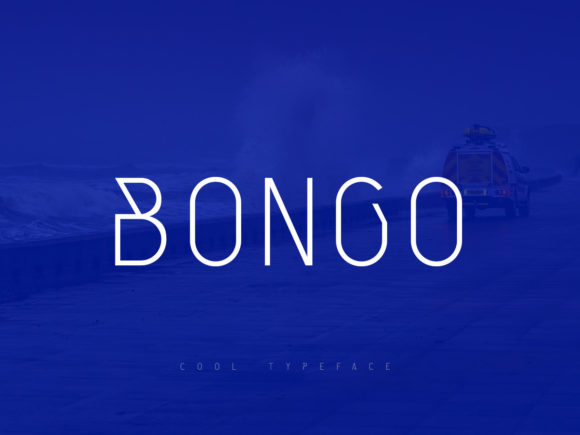
When you first encounter Bongo, it is impossible to miss its distinct character. It is a cool, geometric, and thin lettered display font that immediately signals a futuristic touch. For designers, marketers, and creative entrepreneurs, the allure of such a typeface is strong. It promises modernity, sleekness, and a high-tech aesthetic that can elevate a brand identity from mundane to memorable. However, the very qualities that make Bongo striking are also the primary sources of error for those who deploy it without caution. Using this font effectively requires more than just dropping it into a design tool; it demands an understanding of its structural limitations and visual weight.
The decision to use Bongo often stems from a desire to project innovation. Whether you are designing a website header, a business card, or a promotional banner, the thin, geometric lines suggest precision and forward-thinking. But there is a fine line between "sleek" and "unreadable." Many users overlook the critical balance between aesthetic appeal and functional usability. Before committing to Bongo for your next project, it is essential to understand where common mistakes occur and how to avoid them to ensure your communication remains clear and professional.
The Trap of Over-Reliance on Display Fonts
A frequent mistake among beginners and even some seasoned professionals is treating Bongo as a versatile body text solution. Because the letters are thin and highly stylized, they lack the visual density required for long-form reading. When used in paragraphs or small print sizes, Bongo can become fatiguing to the eye. The geometric gaps between strokes may cause letters to blur together, especially on lower-resolution screens or when printed on textured paper.
This oversight directly impacts user experience and readability. If a potential client cannot easily read the value proposition on your landing page because the typography is too delicate, the conversion rate will suffer. The futuristic touch should enhance the message, not obscure it. A better approach is to reserve Bongo strictly for display purposes—headlines, titles, logos, and short call-to-action buttons. Pairing it with a sturdy, neutral sans-serif for body text creates a harmonious contrast that maintains the futuristic vibe while ensuring accessibility.
Legibility Challenges at Small Sizes
Another significant misunderstanding involves scaling. Bongo is designed to be seen large. Its thin strokes rely on negative space to define their shape. When scaled down too far, these details vanish. You might find that what looks crisp on your high-definition monitor appears muddy or broken when resized for a mobile view or a small business card corner.
To avoid this, always test your typography across multiple devices and output formats. Check how Bongo behaves at 12px, 14px, and 16px. In many cases, you will find that it simply does not work below a certain threshold. Instead of forcing it to fit, consider using a lighter weight of a standard geometric sans-serif if you need smaller text. This preserves the geometric theme without sacrificing legibility. Remember that efficiency in design means communicating clearly, not just looking cool.
Contrast and Color Selection Errors
The thin nature of Bongo makes it highly sensitive to background contrast. A common error is placing light gray Bongo text on a white background, or white Bongo text on a light gray background. The low contrast causes the letters to disappear into the canvas, defeating the purpose of having a prominent display font. This is particularly problematic for web designs where ambient lighting conditions vary widely for users.
Practical Advice: Always ensure a high contrast ratio between your text and background. Darker shades of black, deep navy, or vibrant accent colors work best against light backgrounds. Conversely, if you are using a dark mode interface, ensure the white or light-colored Bongo text has enough luminance to stand out. Use tools like contrast checkers to verify accessibility compliance. This not only helps users with visual impairments but also ensures that your design looks sharp on all devices.
Kerning and Spacing Missteps
Geometric fonts like Bongo often come with pre-set kerning pairs, but they are rarely perfect for every combination of letters. The uniform width of the characters can lead to awkward spacing issues, particularly with letters that have diagonal or curved elements. Ignoring manual adjustments here can result in uneven visual rhythm, making your headline look unprofessional despite the quality of the font itself.
- Check Diagonal Intersections: Letters like 'A', 'V', 'W', and 'Y' often require tighter kerning to prevent excessive white space at the apexes.
- Monitor Horizontal Balance: Ensure that the visual weight feels balanced across the entire word. Adjust tracking (letter-spacing) slightly wider if the text feels too cramped, or narrower if it feels disjointed.
- Test Acronyms and All-Caps: Bongo shines in all-caps display settings, but wide tracking can sometimes make words feel disconnected. Experiment with tighter tracking for short acronyms to maintain cohesion.
Licensing and Commercial Usage Oversights
Before downloading or purchasing Bongo, it is crucial to verify the licensing terms. Many users assume that a font found online is free for commercial use, which can lead to costly legal issues later. Some fonts offer personal use licenses but require a separate commercial license for business projects, including websites, marketing materials, and client work.
Always read the end-user license agreement (EULA). Check whether the license covers web embedding, print runs, and merchandise. If you are a freelancer working with clients, clarify who holds the license rights. Failing to do so can result in invoices for back-pay or cease-and-desist orders, which damage your professional reputation and wallet. Investing in a proper license upfront is a small price to pay for peace of mind and ethical design practices.
Contextual Relevance and Brand Alignment
Finally, consider whether Bongo aligns with your brand’s overall voice. While it offers a futuristic touch, it may clash with brands that aim for warmth, tradition, or organic authenticity. A law firm, a bakery, or a heritage clothing brand might find Bongo too cold or aggressive. The font communicates specific values: technology, precision, modernity, and minimalism. Using it for a brand that wants to convey handcrafted charm or rustic comfort creates a dissonant message.
Evaluation Checklist:
- Does my target audience associate this style with trust and relevance?
- Does the font complement my logo and other brand assets?
- Is the futuristic aesthetic appropriate for the industry I am operating in?
- Have I tested the font in both digital and physical contexts?
By approaching Bongo with these considerations in mind, you can harness its full potential. It is a powerful tool for creating impactful, modern designs, but only when used with intention and respect for its typographic constraints. Avoid the common pitfalls of poor scaling, low contrast, and incorrect licensing, and you will find that Bongo becomes a reliable ally in your design arsenal rather than a source of frustration.